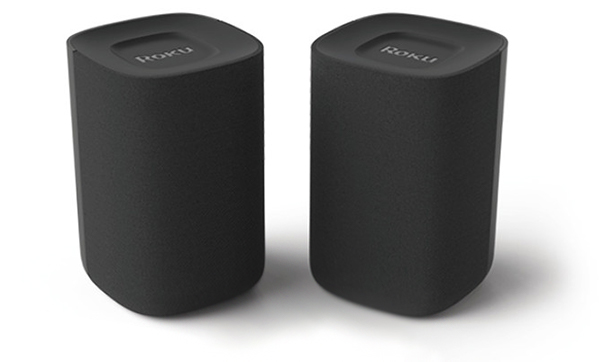
Roku Wireless Speakers add full, rich sound to your TV without messy cables or complicated setup. Just plug them into power and pair them with a Roku TV™, Roku Streambar®, Roku Streambar Pro, or Roku Smart Soundbar. Once connected, you’ll enjoy bigger, clearer sound from streaming apps, live TV, or connected devices like a Blu-ray™ player or game console. You can also pair them with a phone, tablet, or computer over Bluetooth® to play music, podcasts, and more—even with the TV screen off.
Quick Start Guides
- Roku Wireless Speakers (model 9020R2)
- Roku TV Wireless Speakers (model 9030)
- onn. • Roku Wireless Surround Speakers (model 9040)
What you need
- Roku wireless speakers (9020R2, 9030, or 9040 models)
- Power outlet near each speaker (extension cord may be needed)
- A Roku TV, Streambar, Streambar Pro, or Smart Soundbar
- Your Roku remote
- Internet connection. For help, learn how to connect your Roku device to the Internet.
Step 1: Place your speakers
- Each speaker must be near a wall outlet
- Place them on furniture, wall mounts, or speaker stands (make sure stands can hold at least 4 lbs and use a ¼" 20-thread mount). Visit the Roku accessories store to learn about premium wireless speaker mounts from SANUS®.
For best sound:
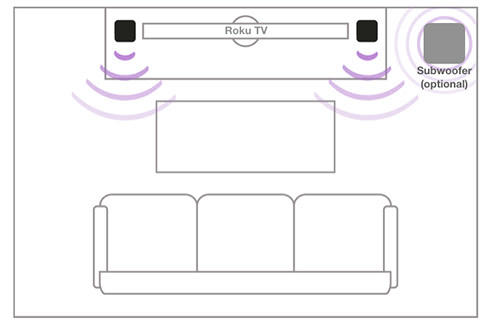
As front speakers: one on the left and one on the right of your TV
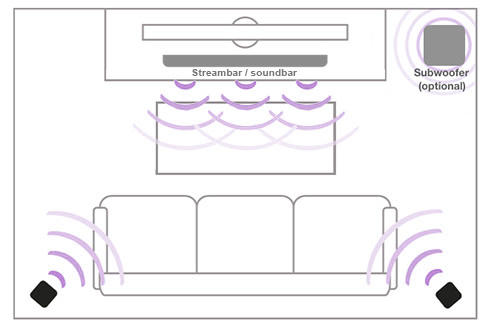
As surround speakers: place them slightly behind your seating, left and right
- Speakers work up to 30 feet from your Roku device.
Step 2: Pair your speakers
- Plug each speaker into a power source and listen for spoken instructions
Make sure your Roku device is on
Press and hold Home
 on your Roku remote for 5 seconds
Select Wireless speakers
- You can also go to Settings > Remotes & devices > Set up a new device
Follow the on-screen steps. Each speaker will play a sound one at a time.
Choose the correct location (left, right, surround) for each speaker.
Tip: Press the pair button at the back if you need to repeat this step
Speakers pair automatically and update during setup. With Roku TV, they work as stereo speakers. With a Streambar or soundbar, they work as surround sound.
- Roku TV: Up to 2 speakers
- Streambar/Streambar Pro/Smart Soundbar: Up to 4 speakers
Step 3: Enable fast TV start (Roku TV only)
Fast TV Start lets you:
- Play audio on your speakers when the TV screen is off
- Wake the TV with voice commands
- Stream from Bluetooth without turning on the screen
Select Continue to enable (you can turn this off anytime in Settings).
How to use your speakers
- Stream a movie or show for full, rich sound
- Use voice commands to play music or podcasts from Spotify, Pandora, iHeartRadio, or TuneIn
- Connect your phone, tablet, or computer with Bluetooth
- Adjust audio settings to fine-tune your experience
Troubleshooting & FAQ
Will these speakers work with any Roku device?
No. They only work with a Roku TV, Streambar, Streambar Pro, or Smart Soundbar. They cannot connect to other Roku players or TVs without Roku built in. You can only use Roku wireless speakers and a Roku TV Wireless Soundbar together if they are paired to a Roku Plus Series or Roku Pro Series TV. Learn more about the different Roku surround sound configurations.
Note:
- Roku wireless speakers only work with a Roku TV system, Roku Streambar, Roku Streambar Pro, or Roku Smart Soundbar. They will not work with a Roku Streambar SE, other TVs, sound systems, or Roku streaming players. Learn how to determine if you have a Roku TV system.
- Roku wireless speakers cannot be paired to your Roku TV system when a Roku Streambar, Roku Streambar Pro, or Roku Smart Soundbar is connected. Instead, they can be paired to a Roku Streambar, Roku Streambar Pro, or Roku Smart Soundbar as wireless surround speakers.
- When Roku wireless speakers are connected to your Roku TV system, the speakers inside the TV are disabled.
The speakers won’t pair.
If the instructions recited by your speakers are not working, try putting your Roku host device in pairing mode from the settings menu. Go to Settings > Remotes & devices > Set up a new device > Wireless speakers. If needed, restart your devices: turn OFF your Roku device, wait 10 seconds, and turn it back ON. Press the Restart button on the back of the speakers to reset them.
I hear no sound from my speakers, or the sound is distorted.
Turn your TV and/or Roku device OFF, wait 10 seconds, then power ON. Press the Restart button on your speakers.
Do I need Wi-Fi to set them up?
Yes. Your Roku device uses Wi-Fi to find and pair your speakers.
My speakers aren’t found when my TV is on a wired connection. What should I do?
Some Roku TVs turn off Wi-Fi when using an Ethernet cable. Temporarily disconnect the cable, connect to Wi-Fi, and pair your speakers. Once paired, you can reconnect the cable.
How far can the speakers be from my TV or soundbar?
They work up to 30 feet away with a good wireless signal.
Need more help?
If you are still having trouble pairing or setting up your speakers, learn how to resolve pairing issues.
Last updated on 6/22/2026 6:22:08 PM
Was this article helpful?
Related articles
Need more help?
