How to choose a wall mount for your TV
Custom wall mount for Roku Pro Series TVs
The Roku Pro Series TV Wall Mount Kit allows you to mount your Roku Pro Series TVs flat against the wall like a work of art and the wall bracket is hinged so you can easily access the back of the TV while it's mounted.Read through the Roku Pro Series TV Wall Mount Kit Installation Guide.
Roku branded TVs follow VESA standard and are compatible with wall mounts that also meet VESA standard. Screws for attaching the legs are included with your TV, but wall-mounting screws are sold separately and vary by mount type. Refer to the charts in the section below to find the weight, VESA pattern, screw size, and dimensions of your Roku branded TV to ensure your wall mount is compatible. If your Roku TV model is made by any other manufacturer, contact them directly for mounting specifications.
Roku TV mounting information
Refer to the chart below to find the mounting information for Roku Select Series HD,Roku Select Series 4K, and other TV models.| TV Size | Models(s) | Approximate Weight | VESA Pattern | Screw Size and Hole Depth | Height x Width x Depth |
|---|---|---|---|---|---|
| 24" | 24R2A5R | 6 lb | 100 x 100 mm | M4*5 mm | 13.1" x 21.7" x 3.4" |
| 24" | 25R2D5 | 5.3 lb | 100 x 100 mm | M4*5 mm | 12.8" x 21.1" x 3.2" |
| 32" | 32R2A5R | 8 lb | 200 x 100 mm | M4*5 mm | 17.1" x 29" x 3.1" |
| 32" | 32R2CX 32R3CX | 8.3 lb | 100 x 100 mm | M4*8.5 mm | 17.2" x 28.9" x 2.8" |
| 32" | 32R2B4 32R2B5 32R2BX | 8.3 lb | 100 x 100 mm | M4*10 mm | 17.2" x 28.9" x 2.8" |
| 32" | 32R3B5 32R3BX | 8.2 lb | 100 x 100 mm | M4*10 mm | 17.2" x 28.9" x 2.8" |
| 32" | 32R2D5 | 7.6 lb | 200 x 200 mm | M4*8.5 mm | 17.2" x 28.9" x 2.8" |
| 32" | 32R3D5 | 7.6 lb | 200 x 200 mm | M4*10 mm | 18.3" x 32.1" x 3.5" |
| 40" | 40R3CX | 11.6 lb | 100 x 100 mm | M6*10 mm | 20.4" x 35.6" x 2.5" |
| 40" | 40R2A5R | 11 lb | 200 x 100 mm | M6*8 mm | 20.5" x 35.5" x 3.2" |
| 40" | 40R3B5 40R3BX 40BA | 11.6 lb | 100 x 100 mm | M6*10 mm | 20.4" x 35.6" x 2.5" |
| 40" | 40R3D5 | 11.0 lb | 200 x 100 mm | M6*10 mm | 20.5" x 39.7" x 3.1" |
| 43" | 43R4A5R 43R4A4 43R4AX | 15 lb | 300 x 300 mm | M6*8 mm | 22.4" x 37.9" x 3.4" |
| 43" | 43R4CX | 14.4 lb | 300 x 300 mm | M6*8 mm | 21.9" x 37.7" x 3.3" |
| 50" | 50R4A5R 50R4A4 50R4AX | 20 lb | 400 x 300 mm | M6*16 mm | 25.7" x 44" x 3.2" |
| 50" | 50R4CX | 18.4 lb | 400 x 300 mm | M6*12 mm | 25.6" x 43.8" x 3.3" |
| 50" | 50BA | 20 lb | 400 x 300 mm | M6*12 mm | 25.3" x 44" x 3.2" |
| 50" | 50R5CX | 18.4 lb | 400 x 300 mm | M6*12 mm | 25.6" x 43.8" x 3.3" |
| 55" | 55R4A5R 55R4A4 55R4A6 55R4AX | 30 lb | 400 x 300 mm | M6*16 mm | 28.4" x 48.5" x 3.2" |
| 55" | 55R4CX | 22 lb | 400 x 300 mm | M6*12 mm | 27.9" x 48.3" x 3.3" |
| 55" | 55R5CX | 22 lb | 400 x 300 mm | M6*12 mm | 27.9" x 48.3" x 3.3" |
| 65" | 65R4A5R 65R4A4 65R4AX | 33 lb | 400 x 300 mm | M6*16 mm | 33.1" x 57.1" x 3.3" |
| 65" | 65R4CX | 31.1 lb | 400 x 300 mm | M6*16 mm | 32.8" x 56.9" x 3.4" |
| 65" | 65R5CX | 31.1 lb | 400 x 300 mm | M6*16 mm | 32.8" x 56.9" x 3.4" |
| 75" | 75R4A5R 65R4AX | 50 lb | 400 x 300 mm | M6*16 mm | 38.1" x 65.9" x 3" |
| 75" | 75R4CX | 46.7 lb | 400 x 300 mm | M6*12 mm | 37.9" x 65.7" x 3.4" |
| 75" | 75R5CX | 46.7 lb | 400 x 300 mm | M6*12 mm | 37.9" x 65.7" x 3.4" |
| 85" | 85R4CX | 60.2 lb | 600 x 400 mm | M8*14 mm | 42.7" x 74.5" x 3.6" |
| 85" | 85R5CX | 60.2 lb | 600 x 400 mm | M8*14 mm | 42.7" x 74.5" x 3.6" |
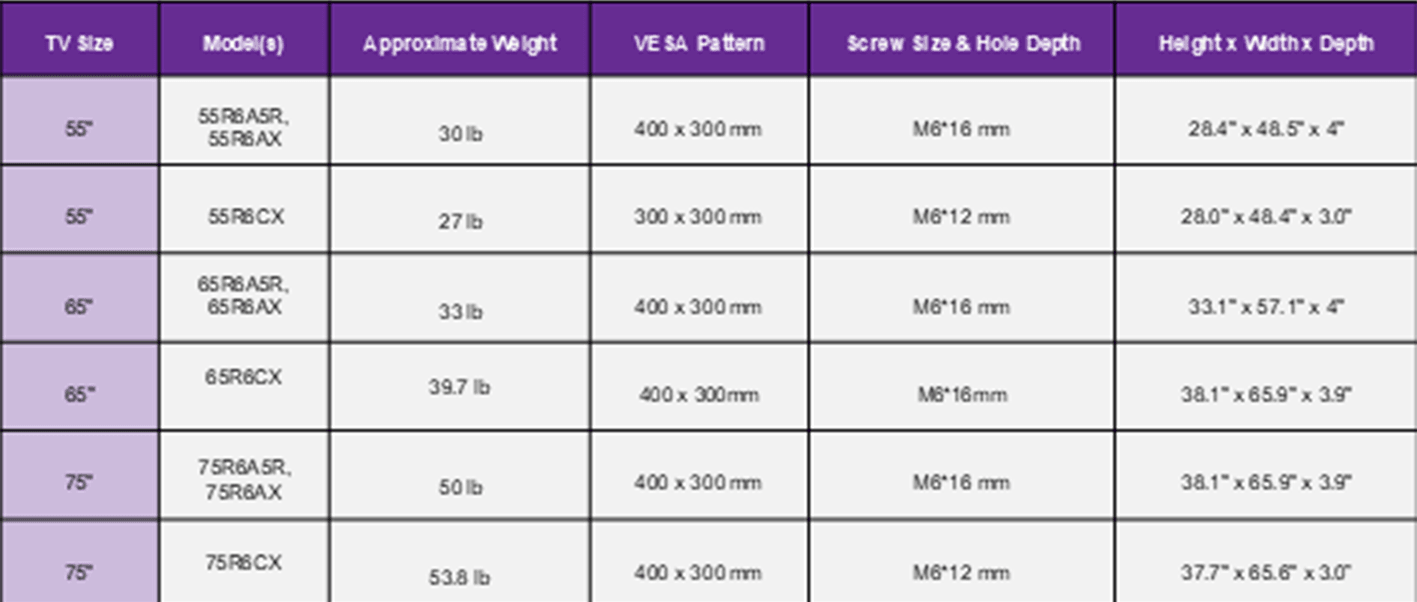
| TV Size | Model(s) | Approximate Weight | VESA Pattern | Screw Size and Hole Depth | Height x Width x Depth |
|---|---|---|---|---|---|
| 55" | 55R6A5 55R6AX | 30 lb | 400 x 300 mm | M6*16 mm | 28.4" x 48.5" x 4" |
| 55" | 55R6CX | 27 lb | 300 x 300 mm | M6*12 mm | 28" x 48.4" x 3" |
| 65" | 65R6A5 65R6AX | 33 lb | 400 x 300 mm | M6*16 mm | 33.1" x 57.1" x 4" |
| 65" | 65R6CX | 39.7 lb | 400 x 300 mm | M6*12 mm | 32.8" x 56.9" x 3.1" |
| 75" | 75R6A5 75R6AX | 50 lb | 400 x 300 mm | M6*16 mm | 38.1" x 65.9" x 3.9" |
| 75" | 75R6CX | 53.8 lb | 400 x 300 mm | M6*12 mm | 37.7" x 65.6" x 3" |
| TV Size | Model(s) | Approximate Weight | VESA Pattern | Screw Size and Hole Depth | Height x Width x Depth |
|---|---|---|---|---|---|
| 55" | 55R8B5 55R8BX 55R8CX | 41 lb | 200 x 200 mm | M6*10 mm | 28.1" x 48.6" x 1.9" |
| 65" | 65R8B5 65R8BX | 64 lb | 400 x 300 mm | M6*14 mm | 33.0" x 57.2" x 1.9" |
| 65" | 65R8CX | 63 lb | 400 x 300 mm | M6*14 mm | 33" x 57.2" x 1.9" |
| 75" | 75R8B5 75R8BX | 83 lb | 400 x 400 mm | M6*14mm | 38.0" x 64" x 2.0" |
| 75" | 75R8CX | 82 lb | 400 x 400 mm | M6*14mm | 38" x 64" x 2" |
Refer to the chart below to find the mounting information fro Roku Hiro models
| TV Size | Model(s) | Approximate Weight | VESA Pattern | Screw Size and Hole Depth | Height x Width x Depth |
|---|---|---|---|---|---|
| 24" HD | H24C2C4 | 5.5 lb | 200 x 200 mm | M4*5 mm | 12.8" x 21.1" x 3.0" |
| 32" (HD) | H32C2C4 | 7.4 – 7.5 lb | 200 x 200 mm | M4*5 mm | 16.9" x 28.3" x 3.2" |
| 40" (FHD) | H40C3C4 | 11.4 – 11.7 lb | 200 x 300 mm | M6*8 mm | 20.4" x 35.1" x 3.1" |
| 50" (4K) | H50C4C4 | 15.6 lb | 300 x 300 mm | M6*12 mm | 25.6" x 43.7" x 3.1" |
| 55" (4K) | H55C4C4 | 18.7 lb | 300 x 300 mm | M6*12 mm | 28.1" x 49.4" x 3.5" |
| 65" (4K) | H65C4C4 | 27.5 lb | 300 x 300 mm | M6*12 mm | 32.8" x 56.9" x 3.2" |
Types of wall mounts
Most wall mounts fit into one of three categories based on their features: fixed mount, tilting mount, or full motion mount. See the details below to help determine which wall mount is best for your situation.
Fixed Mount
Fixed mounts are the simplest type of mount and also tend to be the least expensive. With a fixed mount, your TV is mounted on the wall in a static position and cannot be moved or adjusted. This type of mount uses a minimal amount of space, since it stays flat to the wall.
Tilting Mount
Tilting mounts allow you to tilt the angle of your TV for better viewing. These mounts tend to be used in situations where your TV is mounted above eye level, such as over a fireplace.
Full Motion Mount
Full motion mounts offer both tilt and swivel adjustment, which allows you to get the perfect viewing angle in many different situations. You can swivel to cut out glare from a window and tilt to view a TV mounted above eye level. These mounts tend to be the more expensive because of the complex engineering to support the different motion.
How to choose a wall mount
When choosing a wall mount for your TV, you should consider both the compatibility and safety factors of the mount.
Wall mount compatibility
All Roku branded TVs support a standard VESA pattern, but there several different VESA sizes. Learn more about the VESA standard at https://vesa.org.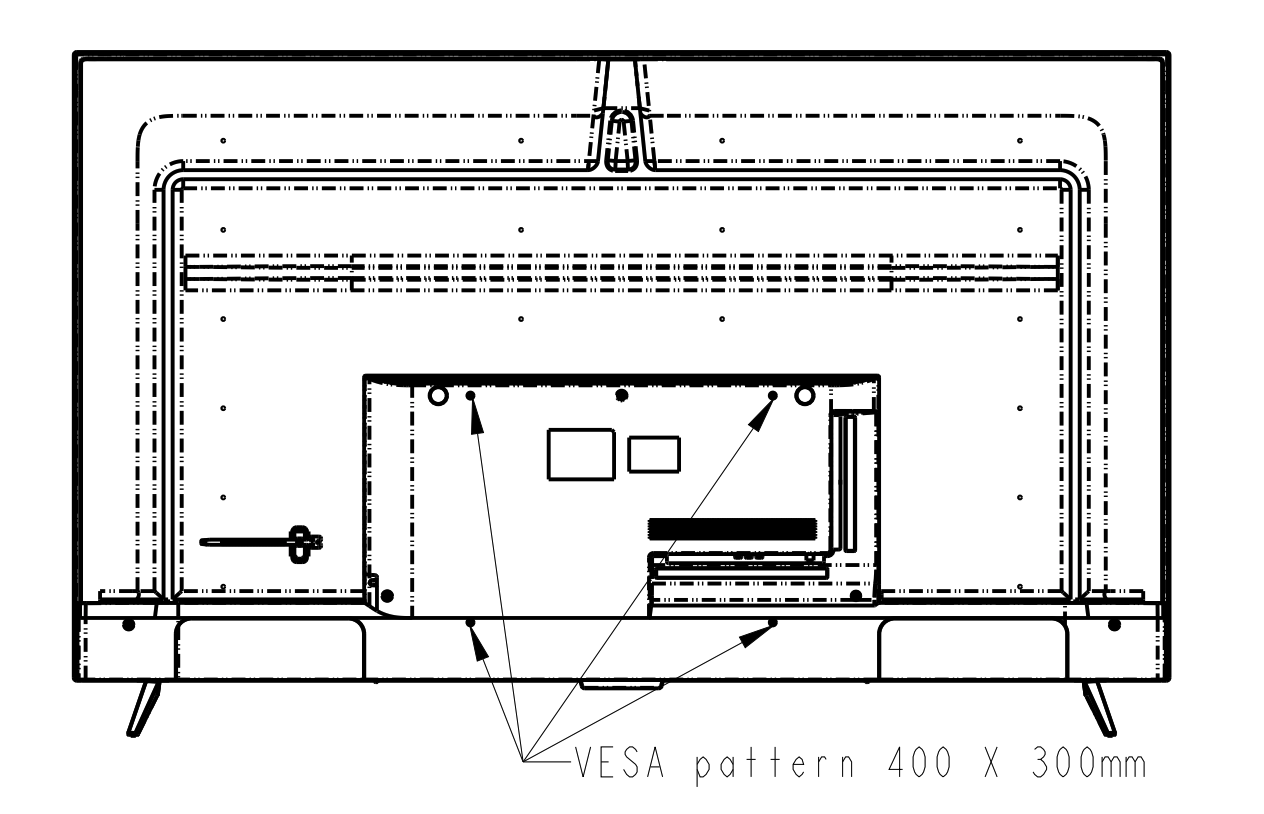
Consider the following when looking for a compatible mount:
- Choose a VESA wall mount. Choose a mount that matches the specific VESA pattern of your TV.
- Check the weight rating. Choose a wall mount that is rated to handle the weight of the TV.
- Use the right hardware. Ensure the wall mount comes with screws that are the right size and depth for your TV, or purchase these items separately.
- Choose a safety certified mount. Choose a mount certified by an independent laboratory, such as UL®, CS, or ETL®.
Using an existing wall mount
If you are replacing an old TV with a new Roku branded TV, you may already have an existing wall mount. If your existing mount follows VESA standards and is rated for the size and weight of your new TV, you may be able to reuse it as is. Check the specifications of your wall mount and new Roku branded TV to ensure compatibility.

Note: Some mounts may require the addition of standoffs to seat properly behind your Roku branded TV. These parts are typically included along with extra screws in your wall mount kit, but you may need to purchase additional parts.
Wall mount installation tips
When you are ready to mount your TV, there are several things to consider during installation to get the best results.
Review the following best practice and safety tips for wall mount installation:
- Get help with installation. Use two people to safely wall mount the TV or contact a professional TV mounting service for assistance.
- Follow instructions. Follow all mounting instructions provided by the manufacturer or supplier of your wall mount.
- Use a level. Verify your wall is vertical and use a level while mounting.
- Mount to a sturdy surface. Ensure the desired wall is appropriate for mounting and can support the weight of the TV. Refer to the mount manufacturer instructions on using anchors or mounting to a stud.
- Make small adjustments. If using an adjustable mount, make small changes to the tilt and swivel to fine-tune your viewing angle.
Last updated at 3/5/2026 5:21:50 AM
Was this article helpful?
Related articles
Need more help?
