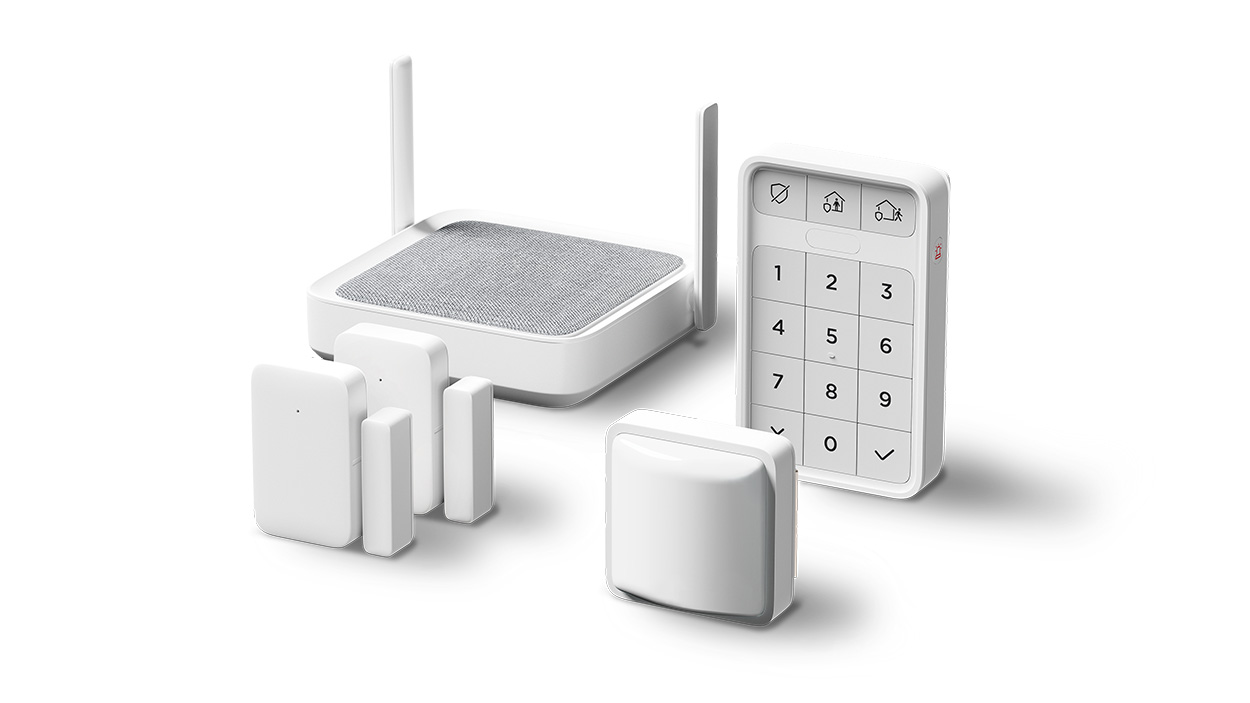
Roku® Home Monitoring System SE helps you protect what you love with easy alarm-enabled entry and motion detection. Get instant alerts in the Roku Smart Home mobile app and take action yourself or let live agents handle it with 24/7 Pro Monitoring powered by Noonlight (subscription required). With a simple-to-use system and stress-free setup, you’ll have peace of mind in no time.
The five-piece starter kit bundle will get your foot in the door of home monitoring and keep unwanted guests out. Easily add additional entry sensors, motion sensors, and keypads for whole-home monitoring and extra peace of mind.
Roku Home Monitoring System is intended for private home monitoring only. Use of the Home Monitoring System may be subject to permit, license or registration requirements. Check your state laws regarding placement of monitoring systems in public spaces. Check your local and state laws regarding the use of professional monitoring services for private residences.
How do I get started?
Your Roku® Home Monitoring System SE includes the following components:
- Roku Monitoring Hub: Provides long-range coverage for all your sensors and features a built-in siren.
- Roku Entry Sensor (x2): Alerts when a door or window is opened, closed, or left open.
- Roku Motion Sensor: Detects motion, but ignores pets, up to 25 feet.
- Roku Keypad: Quickly turn your alarm modes on and off or manually trigger the alarm.
- Window decal (x2): Let everyone know you are monitoring your home with Roku.
Your monitoring hub needs to be connected to a wall outlet, using the included power adaptor, and connected to the internet via Wi-Fi or the provided ethernet cable. Your entry sensors, motion sensor, and keypad come with batteries and adhesive strips for mounting in the best locations for your home.
The Monitoring tab in the Roku Smart Home mobile app will become the center for your home monitoring experience. You’ll have full access to turn alarm modes on and off, manage alerts, and events from all sensors on one single tab. Your system will allow you to monitor one location per Roku account.
For guided assistance, you can find detailed instructions in the setup article or see an overview in the Quick Start Guide.
When you are ready, download the Roku® Smart Home mobile app.

To learn more about your Roku Smart Home device before you begin, take a moment to review the helpful resources in this article.
After you are finished with setup, refer to the features below to find out how easy it is to use your home monitoring system. If you run into any issues along the way, check out the troubleshooting topics for more help.
Features of your home monitoring system
Now that your Roku® Home Monitoring System SE is set up, check out all the great features included with your system.
- Motion detection: Detect movement up to 25 feet with a 120° range with the motion sensor.
- Entry detection: Get an alert when a door, window, or even doggie door is open, closed, or left open. Prevent false alarms by setting entry and exit delays before an alarm goes off.
- Alarm modes:Customize your home and away alarm modes so you choose which sensors are active when you are at home or away. Only monitoring sensors can trigger alarm events such as the siren or escalation to Noonlight agents.
- Critical alerts: Bypass your phone's Do Not Disturb mode to get a notification when a sensor is triggered or the alarm goes off (iOS devices only).
- Expandable: Easily add more motion sensors, entry sensors, smart cameras, smart doorbells, and smart lights in the Roku Smart Home mobile app.
- Long battery life: The energy-efficient design of Roku sensors and keypad preserves battery life so your components stay powered for up to 18 months.
- Battery backup: Your monitoring hub has a built-in battery backup that can last 8 to 10 hours with normal use.
When you sign up for Pro Monitoring powered by Noonlight, you unlock additional features for your system.
- 24/7 Professional monitoring powered by Noonlight: Round-the-clock agents contact you immediately when an alarm is triggered in your home and send assistance if you cannot respond.
- One-tap emergency assistance: A single tap in the Roku Smart Home mobile app contacts a live agent who will get help to your home as quickly as possible.
- Manual emergency buttons: For unexpected emergencies while your alarm mode is off, manually sound the alarm and request emergency assistance with the panic button on your keypad.
- Address mapping: Emergency services will have your exact home address which can expedite the response time.
Troubleshooting your home monitoring system
For additional help solving an issue with your home monitoring system or one of its features, refer to the detailed articles below.
Last updated at 8/14/2026 6:41:46 PM
Was this article helpful?
Related articles
Need more help?
