How to use Guest Mode on a Roku streaming device
The next time you see a Roku streaming device in a short-term rental, ask your host to put the device into Guest Mode. In Guest Mode, you can sign into your own apps to watch your content. On a date that you select, you are automatically signed out and your information is deleted. Guest Mode provides peace of mind that your viewing history remains private and all your accounts are secure.
Guest Mode is available in US, Canada, UK, Latin America, France, Mexico and other countries. Guest Mode is not available in Germany or Australia. Depending on the Roku OS version installed on your streaming device Guest Mode may also be called Auto Sign Out.
This article explains how to use Guest Mode as a guest. If you own a Roku streaming device, you can learn how to set up Guest Mode on your device.
What is Guest Mode?
As a guest, you can enjoy the following benefits when using Guest Mode:
- Watch content on your own accounts. Sign into your favorite apps like Hulu, Netflix, Prime Video, ESPN, Sling TV to watch content on your accounts.
- Automatic and manual sign-out for data deletion. At 11:00 AM on the date you choose, you will be automatically signed out. All your credentials, viewing history, added apps, and more will be deleted.
- Add new apps. Roku has 10,000+ apps to choose from to help you discover something new.
- Search content. Find the perfect thing to watch with Roku Search. All search history will be erased when you are signed out.
- Change settings. Easily improve accessibility by enabling closed captioning, text-to-speech screen reader, or theme pack. All changes will be removed when you sign out.

Note: Subscription channels with live content may limit the number of times you can sign in from different locations. Visit the channel provider's website to learn about their policies.
How to get started with Guest Mode
When you first use a Roku streaming device in Guest Mode, you will be greeted with a welcome screen prompting you to choose the checkout date.
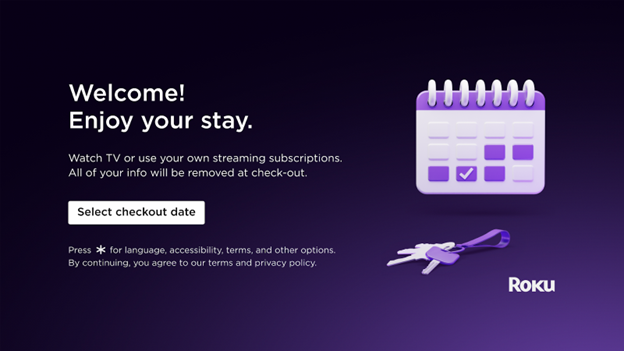
Use the following instructions to get started with Guest Mode.
- Press OK
 on the Roku remote to Select checkout date
 - If you prefer a different language, press Star
 to change your language
 - On the calendar, highlight your checkout date and press OK on the remote select it
- Select the highlighted Checkout button to confirm the date
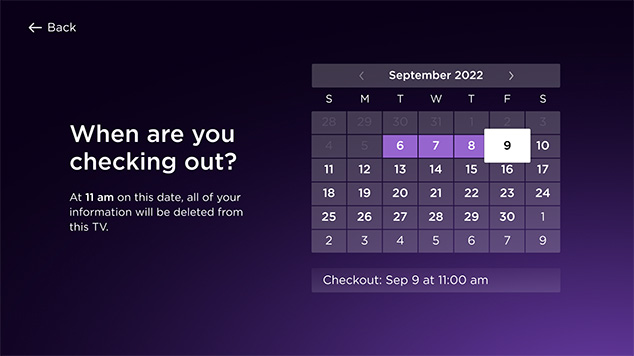
Note: The checkout time can not be changed from 11:00 am.
After starting your Guest Mode session, you will see the Home Screen menu. Return to the Home Screen at any time by pressing Home on the Roku remote.
You can add channels in Guest Mode the same way you would on your own Roku streaming device. Some apps like The Roku Channel, CBS News, iHeartRadio and YouTube let you stream content without signing in. In Guest Mode, you cannot make purchases that are billed to your host's Roku account. You can only make purchases when you sign in to an app where you have a payment method on file.
How to change the Guest Mode sign-out date
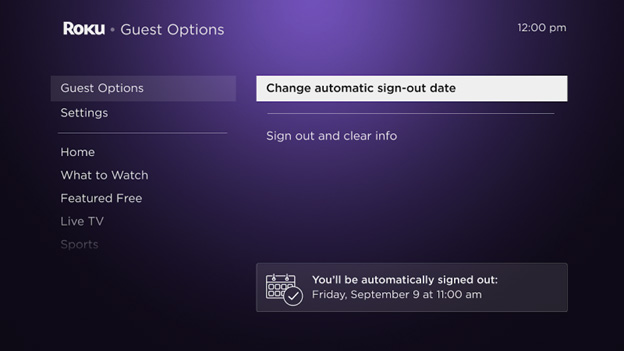
You can change the sign-out date from the Guest Options menu.
- Press Home on the Roku remote
- Scroll and select Guest Options
- Select Change automatic sign-out date
- Navigate the calendar and choose a new date
- Select the highlighted Checkout button to confirm the date
How to sign out of Guest Mode
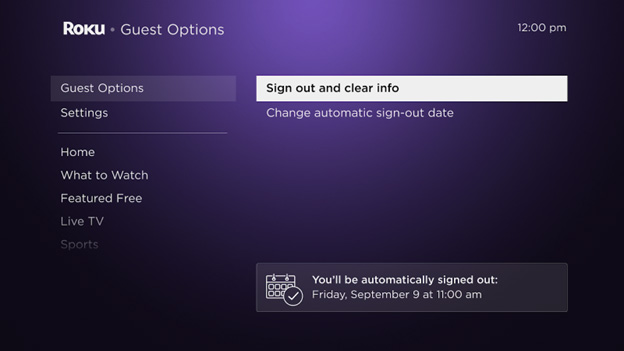
If needed, you can manually sign out at any time. Once you sign out, all your account information and details are deleted.
- Press Home on the Roku remote
- Scroll and select Guest Mode Options
- Select Sign out and clear info and confirm
What if I leave early and forget to sign out?
If you leave early and forget to sign out of Guest Mode, contact your host and ask them to sign you out remotely by following these steps:
- Sign in to https://my.roku.com/account
- Scroll down to My streaming devices & TVs
- Find your Roku device and select Sign Guest Out
- Select Yes, sign guest out now
Beware of scams involving Guest Mode
If you did not enable Guest Mode, or are being directed to an unrecognized website to disable Guest Mode, beware, as this is a scam. Roku will never ask you to pay to remove Guest Mode. Immediately reset your Roku account password by going to my.roku.com and navigating to Account info > Reset password. If you need help, contact Roku support.Last updated at 2/19/2026 7:58:59 PM
Was this article helpful?
Related articles
Need more help?

Chat with us
Get help from our support bot or connect to an advisor.