How do I resolve problems with my Roku IR (infrared) remote?
Remote issues differ based on the type of Roku remote. Before troubleshooting, you should first determine which type of remote you use with your Roku®streaming player.
- Standard IR (infrared) remote
- Enhanced “point-anywhere” remote
If you are not sure, a simple method for determining the type of remote is to remove the cover from the battery compartment and look for a pairing button.
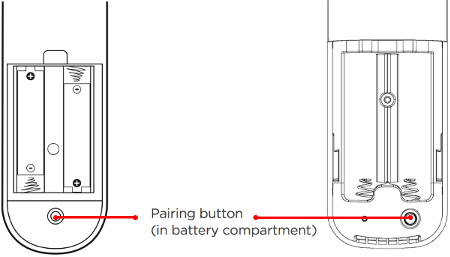
A remote that doesnothave a pairing button is a standard Roku IR remote.If you have this type of remote, the troubleshooting steps in this article can be used to address your problem.
Any remote with a pairing button is called a Roku Enhanced Remote. There is a unique set ofsteps for troubleshooting a Roku Enhanced Remote.
If you need more help determining which remote is used by your Roku device, reviewguidelines for determining the type of remote.
How does a standard IR remote work?
Your standard IR remote uses invisible infrared (IR) light to send the signal a short distance from the remote (where the IR transmitter is located) to the front of your Roku device (where the IR receiver is located). To operate reliably, your IR remote must be pointed directly at your Roku device and there must be nothing that could block the signal.
Why is my Roku IR remote not working?
When you press a button and your Roku device does not respond, or it responds erratically, you may think your remote is not working or that it is unresponsive. However, the most common reason for missed button presses is a Roku device that is located in a position where the signal from the remote is blocked (or partially blocked). The second most common reason is low or dead batteries. To resolve problems where it appears your Roku IR remote has stopped working, try the following:
- Test for visible obstructions
- Make sure you can see the front of your Roku device from where you are sitting. Try holding your remote higher (e.g., above your head) and point it downwards at the front of your Roku device. Move the remote to the left and right, making sure it is always pointing directly at the front of your Roku device. If your Roku device becomes more responsive when testing from various positions, check that no obstructions are blocking the front of your Roku device, or the signal from your remote. Move any obstacles that may block the signal, or if possible, move your Roku device to a position where it responds reliably to button presses.
- Reseat the batteries
- If your Roku device is still not responding to button presses, try removing the batteries from your remote and re-insert them.
- Replace the batteries
- If your Roku device continues to be unresponsive to button presses,tryreplacing the batteriesin your remote.
- Try a new remote
- If none of the above steps solve your problem, you may need to replace your remote. Be sure any new remote is compatible with your Roku device before making a purchase.
Pro Tip:If you own a smartphone with a camera, you may be able to use it to see whether the remote is sending an IR signal or not. Smartphone cameras can “see” a wider range of light wavelengths than the human eye and can therefore detect infrared light. However, this will generally only work on smartphones with a front-facing camera. Put your smartphone into the camera mode as if you were taking a self-portrait (you should see yourself in the camera). Hold the remote control in front of the camera and press several different buttons. If you cannot see the a flashing signal from the front of your remote as you press buttons, then try replacing the batteries in the remote.
Roku Express
If you are having issues using the standard IR remote that is included with your Roku Express, there are some additionalinstructions for troubleshooting missed button presseson these players.
Warm or hot to touch
If the back of your Roku remote gets warm or hot during normal use, follow these steps:
- Discontinue use of your remote
- Place remote on a hard non-flammable surface (like tile) and let it cool. Do not attempt to remove batteries while hot!
Last updated at 2/19/2026 8:00:29 PM
Was this article helpful?
Related articles
Need more help?
