Algunos reproductores de streaming Roku vienen con un control remoto simple que usa luz infrarroja invisible (IR) para transmitir las señales al presionar los botones a corta distancia. Para que el control remoto simple funcione de forma correcta, no debe haber nada que pueda obstruir que la señal viaje desde el control hasta la superficie plana frontal del reproductor (donde aparece la luz de estado cuando está encendido).
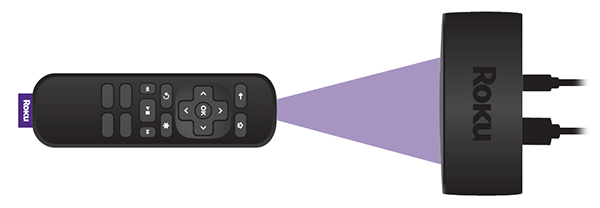
Cuando el reproductor no reconoce los botones que presiona del control simple, por lo general se debe a la ubicación del reproductor o a que las baterías están descargadas. Para obtener más ayuda para determinar qué control remoto utiliza tu dispositivo Roku, consulta las pautas para determinar el tipo general de control remoto Roku.
Las sugerencias de este artículo tienen como propósito ayudar a los propietarios de Roku Express, Roku Express 4K y Roku Premiere. Si necesitas ayuda con el control remoto simple que viene incluido con otro dispositivo Roku, consulta los pasos generales para resolver problemas para controles remotos simples.
¿Qué debo hacer cuando no se reconocen los botones que presiono?
Puedes intentar dos cosas:
- Re-locate your Roku player: The most common reason button presses are missed is due to a Roku player located in a position where the signal from the remote is blocked (or partially blocked) from getting to the player. Make sure that you can see the flat front face of your Roku player from where you are sitting and there is no visible obstruction between the player and the remote. The front face is where you see the status light when your player is powered on.
Try holding your remote higher (e.g., above your head) and point it downwards at the front of your Roku player. Move the remote to the left and right, making sure it is always pointing directly at the front of your player. If your player becomes more responsive when testing from various positions, check that no obstructions are blocking the front of your player or the signal from your remote. Move any obstacles that may block the signal, or if possible, move your player to a position where it responds reliably to button presses.
If your Roku player is attached to your TV with the included adhesive strip, try locating it in a different position where the signal is less likely to be blocked. If the player is located along the bottom of the TV, something as simple as a cabinet in front of the TV may block the signal.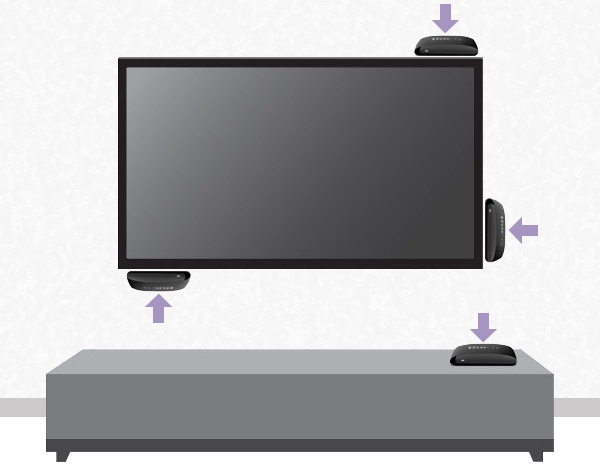
Make sure the Roku player is not located behind the TV or inside a cabinet.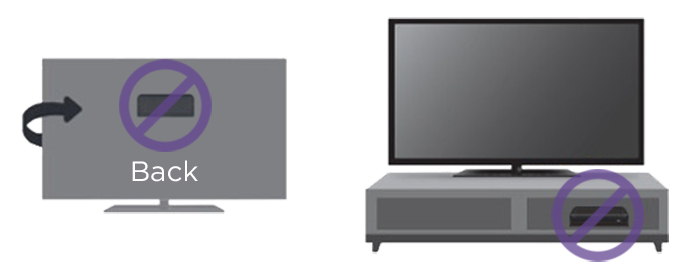
If you need help finding a good location, review the steps for attaching your Roku player to a flat surface. - Change the batteries: If moving your Roku player does not help, then try changing the batteries in the remote. Always make sure to use fresh, matching batteries and that they are positioned correctly.
Last updated at 9/7/2026 5:22:33 PM
¿Te resultó útil este artículo?
Artículos relacionados
¿Necesitas más ayuda?

Soporte técnico con agentes
Ofrecemos soporte técnico con agentes para ciertos problemas y dispositivos.
Consulta las opciones de soporte técnico