Your Roku® simple remote has all the basics you need to control your streaming player including shortcut buttons to popular streaming apps.
This article provides instruction on how to identify and set up your Roku simple remote.
How to tell if you have a Roku simple remote
Roku simple remotes are referred to using different names including:
- Standard remote
- IR remote
- Roku Players remote
- Roku TV remote
Roku simple remotes have the buttons seen below including channel shortcut buttons that let you launch popular streaming apps with a single press. A Roku simple remote is included with many Roku TV models and some streaming players. The simple remote included with a Roku TV system has all the buttons seen on a players remote, along with buttons for a sleep timer and TV power, volume, and mute.
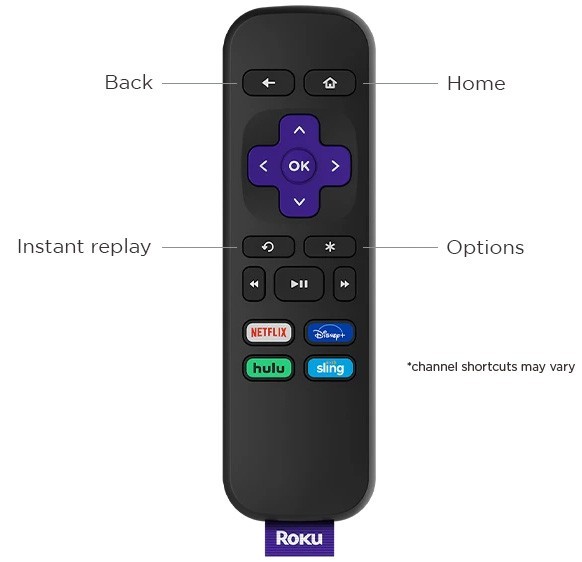
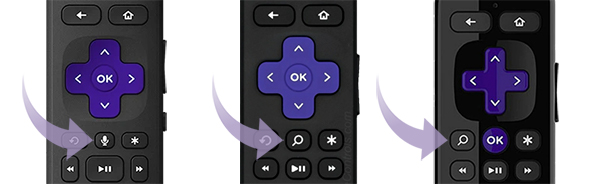
If your remote has a voice button, then you have a Roku voice remote instead and you should go to to the article with detailed instructions on how to set up your Roku voice remote.

Tip: If you still need help determining which remote you have, review the article with tips for identifying your Roku remote.
How to set up your Roku simple remote
To set up a simple remote, you only need to insert new matching batteries, or remove the battery pull tab, and point the remote at the front of your Roku device—it's that simple!
When using your Roku simple remote, it must be pointed directly at your Roku streaming device and there must be nothing blocking the signal from your remote.
Do I need to pair or sync my Roku simple remote?
Roku simple remotes do not have a pairing button. You just need to insert fresh batteries or remove the battery pull tab and then your remote is ready to use immediately.
Frequently asked questions
Can my Roku simple remote work through cabinets or walls?
No. It uses IR (infrared) and requires a direct line of sight to your Roku device.
Tip: If your remote is not working or you have any problems, learn how to fix any issues with your Roku simple remote.
Why isn't my remote working even with new batteries?
Check battery orientation, make sure nothing blocks the signal, and restart your Roku device. If it still doesn't work, the remote may be faulty. Contact Roku support.
What if my remote has a microphone button?
Then it's not a simple remote. Follow the setup instructions for a Roku voice remote instead.
How do I replace a lost or broken simple remote?
Visit the Roku accessories page to purchase a new remote. Be sure to match the remote type (simple/voice/TV remote) to your Roku device model. See What Roku remote do I have? for help.
What can I do while waiting for a replacement remote?
Download and use the free Roku mobile app (iOS or Android), which works as a full remote control.
Can I use the simple remote with any Roku device?
No. Roku simple remotes will only work with Roku TVs.
Last updated at 9/4/2026 4:42:37 PM
Was this article helpful?
Related articles
Need more help?
