Some Roku TVs support removing your TV from your Roku® account and using it in unlinked mode. In unlinked mode, you will still be able to watch live TV channels with a cable box or antenna, and connect Blu-ray or DVD players, gaming consoles or other devices to one of the HDMI inputs. However, you will not be able to use or access Roku’s streaming services, including the apps from our Streaming Store.
A quick way to do this is to perform a hardware factory reset of your TV. If you need help or have questions, please contact Roku’s customer support team here.Performing a factory reset using the hardware reset button
On the back or bottom of each TV is a reset button. On some TVs there is a tactile button, while other devices have a pinhole button. The reset button on your TV will look like one of the following:
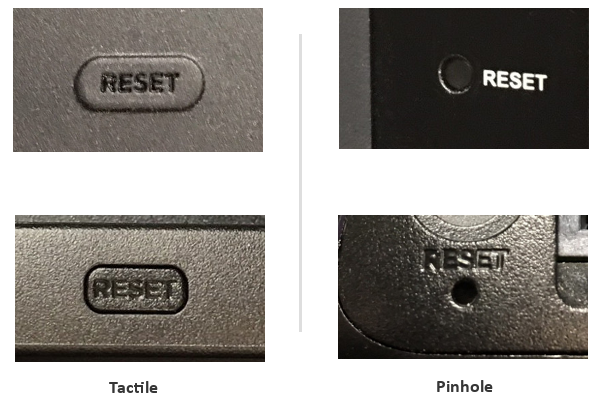
- Locate the reset button on the back or bottom of your TV.
- If your TV has a pinhole button, you will need a paperclip to perform the factory reset.
- Once you locate the reset button and your TV is powered on, press and hold the reset button firmly for about 10 seconds. (Please note that if you hold the button for too long, the TV may go into Recovery Mode rather than factory reset).
- After pressing and holding the reset button, your TV will restart and display the initial setup screen.
- After selecting your language and location, choose Set up for home use.
- If your Roku TV system does not require a Roku account and internet connection for activation, on the next screen, choose Connect to the Internet Later.
a. This option for may not be available on all Roku TV systems (see packaging for details). - Make sure your chosen viewing sources are connected to your TV (such as an antenna, cable or satellite box or HDMI input).
- Choose the input (HDMI, AV or Live TV) for your TV.
Last updated at 6/3/2026 10:55:29 PM
Was this article helpful?
Related articles
Need more help?
