How to use headphones with the Roku mobile app for Headphone Mode
Listen to streaming content using the Roku mobile app through headphones connected to a phone or tablet using Headphone Mode. Enjoy the sound from apps and live digital broadcast television without disturbing people nearby. Aside from mobile app listening, Headphone Mode is also accessible through Bluetooth directly to the host or through a wired connection in some Roku remotes.
You can use the Roku device comparison chart to determine which current-generation products support Headphone Mode with the Roku mobile app.
Note: Headphone Mode is only supported on a Roku Streambar® SE, Roku Streambar, Roku Streambar Pro, or Roku Smart Soundbar when using its built-in streaming player. Headphone Mode is not supported on these products when using an external device such as a game console, Blu-ray™ player, or cable/satellite set-top box; or when using a Bluetooth device such as a smartphone or computer.
What to know before using Headphone Mode
- You must first install the latest version of the Roku mobile app and connect your mobile device to your Roku device. To establish this wireless connection, both your mobile device and your Roku device must be connected to the same wireless network.
- When Headphone Mode is active, you will not hear audio from your TV speakers.
- You must have an HDTV antenna connected to your Roku TV to use Headphone Mode with live digital broadcast television. Mobile Headphone Mode is not supported with analog over-the-air broadcast television.
- Headphone Mode is also available when using your headphones with a compatible Roku voice remote.
How to activate Headphone Mode
Before you begin, make sure your wired headphones are plugged into your mobile device or your Bluetooth headphones are paired and connected. For pairing help, visit the website for the manufacture of your headphones and/or mobile device, or contact them directly. When you are ready, use the steps below to activate Headphone Mode.
Important: Do not put your headphones on until the volume is at a safe level.
- Open the Roku mobile app
- Tap Remote
 from the navigation bar
 - Tap the Headphone icon to activate Headphone Mode
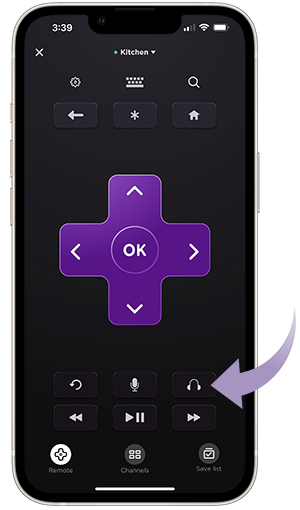
Once Headphone Mode is activated, adjust the volume to a comfortable level and put on your headphones. When you want to deactivate Headphone Mode, simply tap the Headphone icon again. If you have wired headphones, you can also activate and deactivate Headphone Mode by plugging in and unplugging your headphones when the Roku mobile app is already open.
Can more than one person use Headphone Mode at the same time?
Yes. Up to four mobile devices can be connected at the same time for Headphone Mode.
Note: Headphone Mode by multiple users is only supported on mobile devices running the Roku mobile app. If you connect headphones to a compatible Roku voice remote, Headphone Mode on all connected mobile devices will be deactivated.
Troubleshooting Headphone Mode
If you are experiencing intermittent connectivity or hear audio issues (such as lip sync), learn how to solve problems with Headphone Mode.
Last updated at 2/18/2026 3:18:39 AM
Was this article helpful?
Related articles
Need more help?
