How to update the name and location of your Roku device
When you activate your Roku® streaming player or Roku TV™ system you can choose a name and location for your device which is helpful for managing multiple Roku streaming devices in your Roku account, the Roku mobile app, or when using AirPlay or screen mirroring.
If you want to update the name and location of your Roku streaming device after the initial setup process, you can do so from your Roku account, or the Roku mobile app. Roku Smart Home devices and device groups can be renamed in the Roku Smart Home mobile app..
How to update your streaming device name and location
Update your streaming device name and location on my.roku.com
Use the steps below to change your streaming device name or location through your Roku account.
- Go to my.roku.com
- Sign in to your Roku account
- Your streaming devices will be listed under the My devices section
- Click on a device to open Device details
- Click Device location or Nickname, make your changes, and then click Save

Update your streaming device name and location in the Roku mobile app
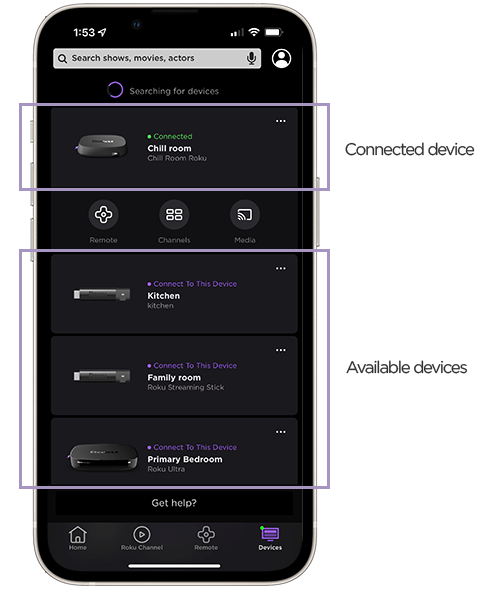
The Roku mobile app for iOS® and Android™ turns your mobile device into a control center for your Roku streaming device. To use the Roku mobile app, you must connect your mobile device to the same Wi-Fi® network as your Roku device. Learn what to do if you do not see your device in the mobile app.
Use the following steps to rename your Roku device in the Roku mobile app
- In the Roku mobile app, tap Devices

- Tap on the device you want to update
- Tap Options••• next to your device
- Select Set Name and Location
- Sign in if prompted
- Update the name and location
- Tap Save to apply changes
How to update your smart home device name
When you add your Roku Smart Home devices you can name each one during the set up process in the Roku Smart Home mobile app. You can rename any smart home device, or device group, connected to your account. Your mobile device and smart home device do not need to be on the same Wi-Fi network.
Use the following steps to rename a smart home device or device group.
- Open the smart home app
- Tap Home
 from the navigation bar
 - Select your device or device group
- Tap Settings
 in the corner
 - Tap Name
- Enter a new name
- Tap the appropriate button to save your changes (Example: Done, Finish Naming, or Save)
Last updated at 2/18/2026 3:18:31 AM
Was this article helpful?
Related articles
Need more help?
