How to create a monitoring schedule with home monitoring rules
This articles provides instructions on how to create a monitoring schedule using home monitoring rules in the Roku® Smart Home mobile app. You can also use rules to automate your other Roku Smart Home devices based on when your home monitoring sensors detect motion or are open and closed.
How to use a monitoring schedule
You can create, turn on and off, and delete monitoring schedules on the Home monitoring rules screen in the Roku Smart Home mobile app.
Use the following instructions to access the Home monitoring rules screen in the mobile app.
- Tap Monitoring
 from the navigation bar
 - Tap Home monitoring settings
- Tap Home monitoring rules
How to create a monitoring schedule
On the Home monitoring rules screen, use the following steps to create a monitoring schedule.
- Tap Create monitoring schedule
- Tap Mode and time
- Select the mode (Off, Home, or Away) and time
- Tap Save
- Select the days on which the schedule will run
- Tap Save
How to turn a monitoring schedule on and off
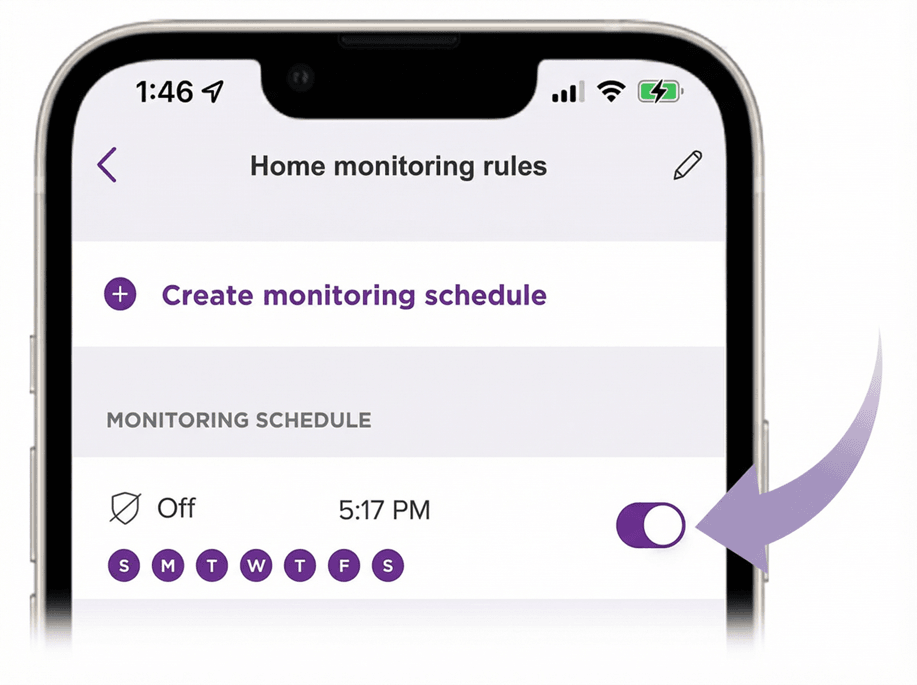
On the Home monitoring rules screen, tap or move the slider to turn the schedule on and off. When the slider is purple, the schedule is active.
How to delete a monitoring schedule
You can delete a monitoring schedule on the Home monitoring rules screen by tapping the pencil icon and then selecting the delete
  icon next to the rule you want to delete.
Last updated at 2/25/2026 10:04:33 PM
Was this article helpful?
Related articles
Need more help?

Chat with us
Get help from our support bot or connect to an advisor.