How to attach your Roku® streaming player using the adhesive strip
Some Roku streaming players ship with a double-sided, removable adhesive strip that can be used to securely attach your player to a flat surface such as a cabinet, table, or even somewhere on your television.
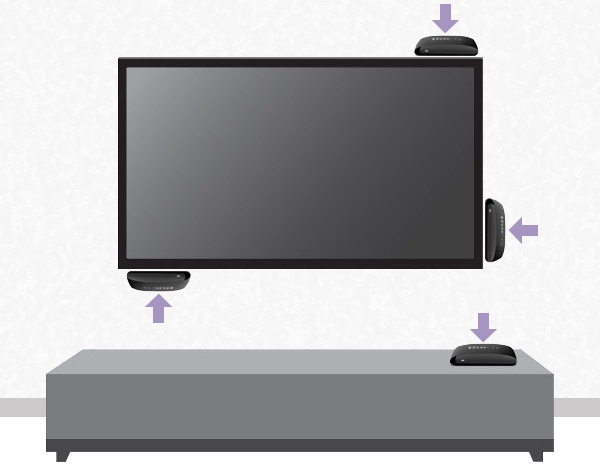
Use of the adhesive strip is optional. It is designed to be removable without leaving a sticky residue, and as a result, can only be used one time. Should you choose to attach your player to a flat surface, it is recommended you only use the included strip. You can purchase additional adhesive strips from the Roku accessories store.

WARNING: It is important to read the installation and removal instructions carefully to ensure correct usage. Incorrect usage could result in property damage.
Player position when controlled by a Roku simple remote
Some Roku players that ship with an adhesive strip come with a Roku simple remote that uses invisible infrared (IR) light to transmit remote button presses. To help identify your remote, review guidelines for determining the type of remote used by your Roku player.
For a simple remote to operate reliably it must be pointed directly at your Roku player when pressing buttons, and there must be no obstructions that could block the signal from traveling from your remote to the front of your player (where the IR receiver is located). For optimal performance, you must follow the guidelines below.
Choose a flat, clean surface where your Roku player can be attached in such a way that your remote can be pointed directly at the flat, front face of your player (where the status light appears when powered on) without obstruction.
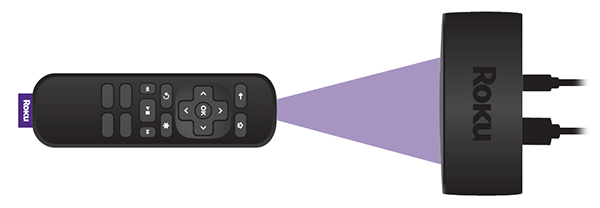
Make sure the adhesive strip will not be attached to the front edge of your Roku player, otherwise it will obscure the IR signal from your remote. Always attach the adhesive strip to the bottom of the player.
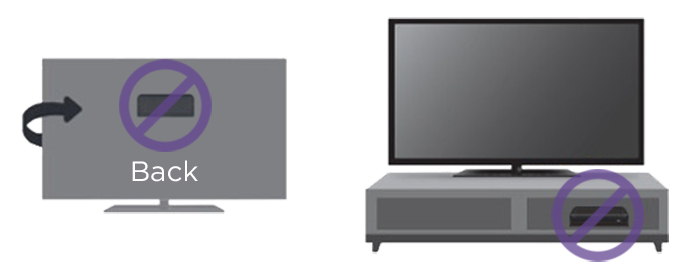
- Do not put your player in a location that prohibits the IR signal from getting to the front of your player, such as behind the TV or inside a cabinet.
Player position when controlled by a Roku voice remote
Some Roku players that ship with an adhesive strip, come with a Roku voice remote that uses a direct wireless connection to transmit button presses. To help identify your remote, review guidelines for determining the type of remote used by your Roku player.
Unlike a Roku simple remote, a Roku voice remote does not need to be pointed directly at your player when pressing buttons giving you the flexibility to install it behind a wall-mounted TV or another nearby, out-of-sight location. However, it is still important you avoid placing it anywhere it may overheat like the inside of a closed cabinet.
How to attach your player
Once you determine where you are going to place your Roku player, follow the instructions below.
- Make sure the flat surface where you are attaching your player is clean.
- Note: Remember, if your player is controlled by a Roku simple remote, the location must not be obstructed.
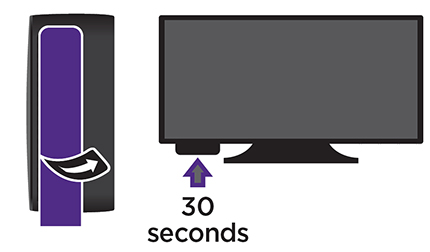
- Remove the striped liner from the double-sided adhesive strip and press the adhesive to the bottom of the player.
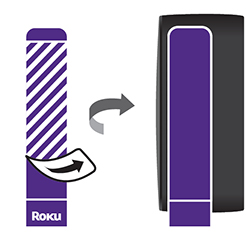
- Remove the other liner, and firmly press your player to the desired location and hold for 30 seconds.
How to remove the adhesive strip
Use the following steps when you need to remove the adhesive strip.
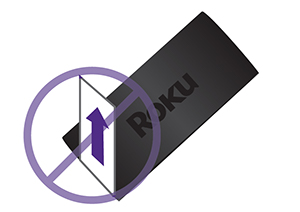
- Hold your Roku player in place and gently pull the adhesive strip sideways.
WARNING: Do not pull the adhesive strip towards you.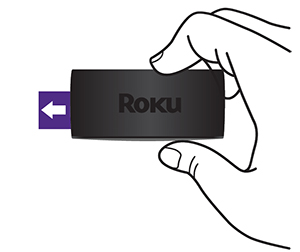
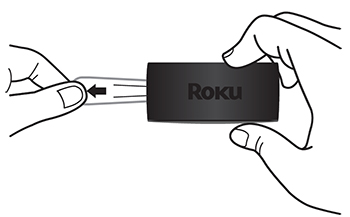
- Stretch the adhesive strip slowly to release.
Where to purchase additional adhesive strips
You can purchase additional adhesive strips from the Roku accessories store.
Last updated at 3/17/2026 9:31:26 AM
Was this article helpful?
Related articles
Need more help?
