Why are remote control button presses missed by my Roku® streaming player?
Some Roku streaming players come with a Roku simple remote that uses invisible infrared (IR) light to transmit button presses a short distance. For your simple remote to work properly, there must be no obstructions that could block the signal from traveling from the remote to the flat front face of the player (where the status light appears when powered on).
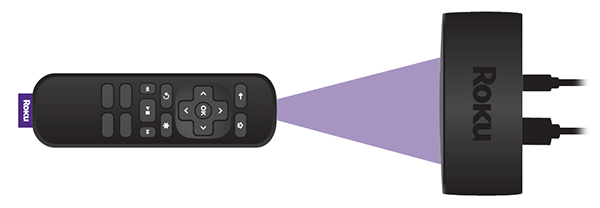
If button presses are missed when using your simple remote with your player, it is commonly due to the location of the player or low batteries. For more help determining which remote is used by your Roku device, review guidelines for determining the general type of Roku remote.
Suggestions in this article are intended to help owners of Roku Express, Roku Express 4K, and Roku Premiere. If you need help with the simple remote included with any other Roku device, refer to the general troubleshooting steps for simple remotes.
What should I do about missed button presses?
There are two things you can try:
- Re-locate your Roku player: The most common reason button presses are missed is due to a Roku player located in a position where the signal from the remote is blocked (or partially blocked) from getting to the player. Make sure that you can see the flat front face of your Roku player from where you are sitting and there is no visible obstruction between the player and the remote. The front face is where you see the status light when your player is powered on.
Try holding your remote higher (e.g., above your head) and point it downwards at the front of your Roku player. Move the remote to the left and right, making sure it is always pointing directly at the front of your player. If your player becomes more responsive when testing from various positions, check that no obstructions are blocking the front of your player or the signal from your remote. Move any obstacles that may block the signal, or if possible, move your player to a position where it responds reliably to button presses.
If your Roku player is attached to your TV with the included adhesive strip, try locating it in a different position where the signal is less likely to be blocked. If the player is located along the bottom of the TV, something as simple as a cabinet in front of the TV may block the signal.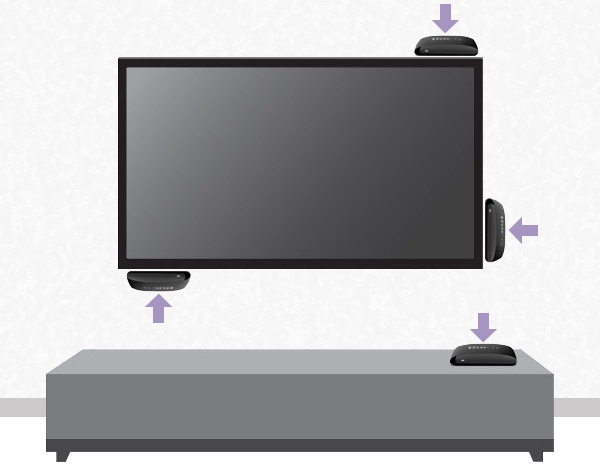
Make sure the Roku player is not located behind the TV or inside a cabinet.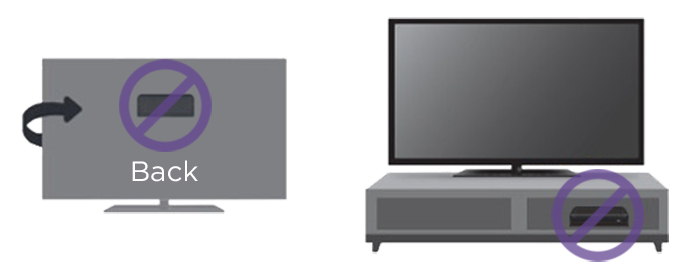
If you need help finding a good location, review the steps for attaching your Roku player to a flat surface. - Change the batteries: If moving your Roku player does not help, then try changing the batteries in the remote. Always make sure to use fresh, matching batteries and that they are positioned correctly.
Last updated at 2/19/2026 7:58:51 PM
Was this article helpful?
Related articles
Need more help?
