How to set up and watch cable or satellite TV on your Roku TV system
Your Roku TV can stream your favorite apps, show free live channels, and connect to your cable or satellite box. If you’re trying to set up your TV, this guide will walk you through everything step by step.
Watch free local channels (antenna)
You can get free, over-the-air channels like ABC, NBC, CBS, and FOX with an HDTV antenna.
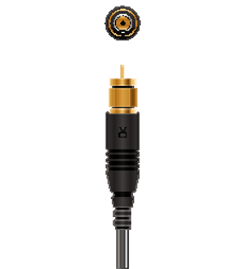
To set it up:
- Connect the coaxial cable from your antenna to the Ant/Cable In port on the back of your Roku TV
- Press the Home
 button on your Roku remote
 - Select Live TV
- Follow the on-screen steps to scan channels. (The scan may take a few minutes.)
- If “Live TV” doesn’t appear on your home screen, go to Settings > TV inputs > Live TV > Set up input.

Note: The number of channels you receive depends on your location and the antenna's positioning. You can try placing it near a window or higher up for better reception.
Watch cable or satellite TV
If you already have a cable or satellite receiver, you can connect it directly to your Roku TV.
To connect it:
- Turn off both your Roku TV and your cable/satellite box.
- Plug one end of an HDMI cable into the cable/satellite box.
- Plug the other end into an open HDMI port on the back of your Roku TV.
- Turn both devices back on.
- Using your Roku remote, go to the Home > select the Input that matches the one you used (for example, HDMI 1 or HDMI 2).
You should now see your cable or satellite picture. If you see “No Signal,” double-check that the cable is fully connected and that you’ve selected the right input.
Note: Some cable systems allow you to connect the coax cable directly to the Ant/Cable In port and scan channels, but many still require a cable box.
How to switch between Roku and cable/satellite
Once everything is set up, you can easily switch between streaming on Roku and watching your cable or satellite box.
On a Roku TV
- Press the Home button on your Roku remote.
- From the main screen, move down to Inputs
- You’ll see a list such as:
- Live TV (for antenna or cable directly connected)
- HDMI 1 (Cable/Satellite Box)
- HDMI 2 (Roku Player or another device)
- Highlight the input you used for satellite/cable (for example, HDMI 1)
- Press OK
 to switch instantly.
With a Roku Streaming Player
If you’re using a Roku Streaming Stick or player connected to your TV, you’ll switch to satellite/cable using yourTV’s remote, not the Roku remote.
- Find the Input or Source button on your TV remote.
- Press it until you see what you want:
- Cable/Satellite: stop when your cable picture appears.
- Roku: stop when the Roku home screen appears.
- Each press changes the input (for example: HDMI 1, HDMI 2, TV)
View program listings
To see what’s on live broadcast TV or free Roku channels:
- Open The Roku Channel > Live TV Channel Guide, or
- From the Home screen, select Live TV
The Channel Guide shows over-the-air and streaming channels but not cable or satellite listings (those still come from your cable box).
Frequently Asked Questions
I connected my cable box, but Roku TV says “No Signal.”
Make sure the HDMI cable is fully plugged in and that you’ve selected the correct HDMI input. If that doesn’t work, try a different HDMI port or cable.
How do I get back to Roku streaming after watching cable on my Roku TV?
Press the Home button on your Roku remote.
I keep pressing the Roku remote, but nothing happens when I’m on cable.
That’s normal. The Roku remote only controls Roku TV functions. To control your cable or satellite box, use the remote that came with that box.
My antenna is connected but no channels show up.
Go to Home > Live TV > Scan for channels. Try repositioning the antenna and scanning again if you still don’t see results.
Last updated at 2/19/2026 7:36:19 PM
Was this article helpful?
Related articles
Need more help?
