How do I know if I have a Roku TV™?
To help you determine if you have a Roku TV, it is important to understand that Roku TVs and Roku® streaming players are different products.
A Roku TV is a standalone smart TV with built-in TV display and Roku operating system that lets you stream content over the internet without needing to connect any additional devices. You can also use a Roku TV just like a normal TV, and connect an antenna to watch live TV, or plug in external devices like a cable set-top box or game console.A Roku player on the other hand, is an external device like a cable set-top box that must be connected to a TV with an HDMI® cable to let you watch content streamed over the internet. A Roku Streaming Stick® is a type of Roku player that also connects to a TV, but it plugs directly into the HDMI port on a TV.
If you are looking to compare features between the latest Roku streaming devices, the following resources will help answer your questions. If you are not sure what type of TV you own, use the guidelines below to help determine if you have a Roku TV.
- Compare features between the current lineup of Roku streaming devices.
- Visit the product finder page for guided help selecting the right Roku streaming device.
Look for the Roku TV logo
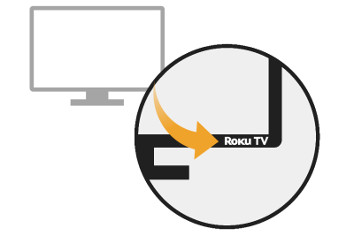
Roku works with a variety of TV manufacturers who build Roku TVs with different screen sizes, price points, and picture resolutions. Along with the branding of the manufacturer somewhere on the front of the display, you can typically also find the Roku TV logo in the corner.
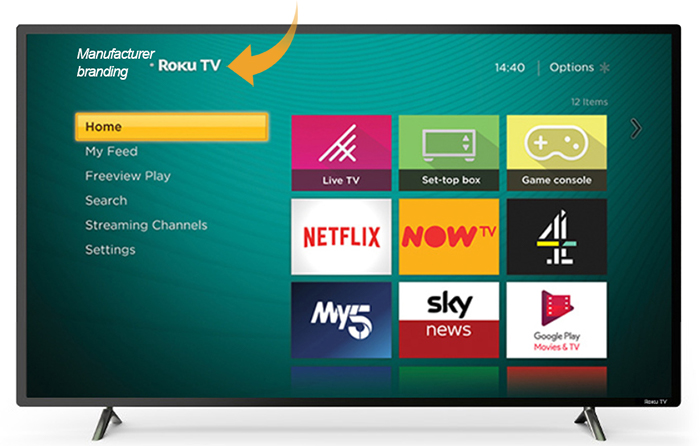
Another place you can look for the Roku TV logo is the home screen. Press the Home button  on your Roku remote and look for the logo in the top corner next to manufacturer branding.
Check the System info page
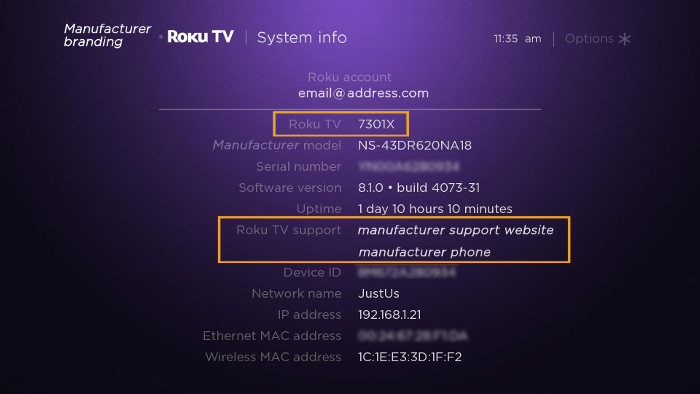
You can also verify that you have a Roku TV (and not a Roku player connected to a TV) by checking the System info page from the Settings menu.
- Press the Home button on your Roku remote.
- Select Settings, and then select System.
- Finally, select About.
When you view the System info page, look for the field titled "Roku TV" that lists the Roku model number. With a Roku player or Streaming Stick, this field is titled "model". You can also look for the field titled "Roku TV support" that lists the manufacturer's contact information. With a player or Streaming Stick, this field is titled "Roku support" and it lists roku.com/support for the contact information.
Last updated at 3/3/2026 1:33:29 AM
Was this article helpful?
Related articles
Need more help?
