How to attach your Roku® Express using the adhesive strip
Roku Express ships with a removable adhesive strip that can be used to securely attach your Roku® streaming player to a flat surface such as a cabinet, table or even the side of your television.
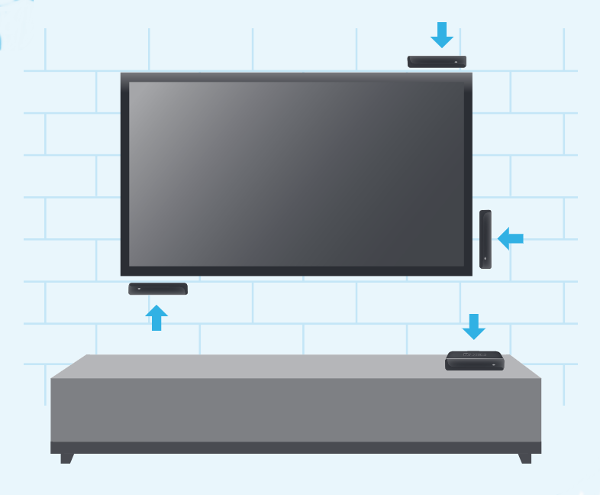
Use of the adhesive strip is optional. Since it is designed to be removable without leaving any residue, it can only be used once. It is recommended that you use the adhesive strip that came with your Roku Express.
Guidelines for attaching your Roku Express using the adhesive strip
Roku Express comes with a standard IR remote. Standard IR remotes use invisible infrared (IR) light to transmit remote key presses. In order for IR remotes to operate reliably they must be pointed directly at the Roku device and there must be nothing that could block the signal from travelling from the remote to the front of the Roku player (where the IR receiver is located).
Therefore, you must adhere to the following guidelines:
- Position the flat front edge of the Roku Express (where the IR Receiver is located) in direct line of sight of your Roku remote.
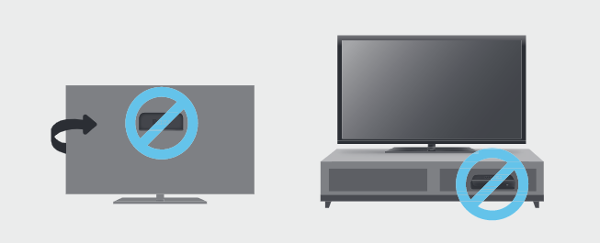
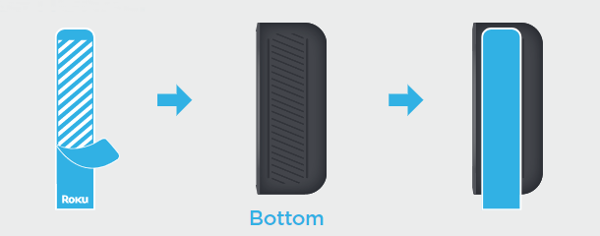
- Ensure the adhesive strip is not attached to the front edge of the Roku Express, otherwise it will obscure the IR signal from the remote control. Always attach the adhesive strip to the top or bottom of the Roku Express:
- Do not put the Roku Express in a location that prohibits the IR signal from getting to the front of the player.
WARNING: It is important to read the installation and removal instructions carefully to ensure correct usage. Incorrect usage could result in property damage.
Removing the adhesive strip
To remove the adhesive strip, follow these steps:
- Hold the Roku player in place.
- Pull the adhesive strip sideways (do not pull the adhesive strip towards you).
- Stretch the adhesive strip slowly on the side (at least 15 inches) to remove.
Last updated at 3/17/2026 9:31:47 AM
Was this article helpful?
Related articles
Need more help?
