Can I use a voice remote with my Roku streaming device?
This article helps you determine if your Roku streaming device is compatible with Roku voice remotes. You can learn how to use voice to search and control your Roku streaming device in another article.

Note: Voice search and voice control is supported in English, German, Portuguese, French, and Spanish. To change the language on your Roku device, go to Settings > System > Language.
Is my Roku streaming device compatible with a Roku voice remote?
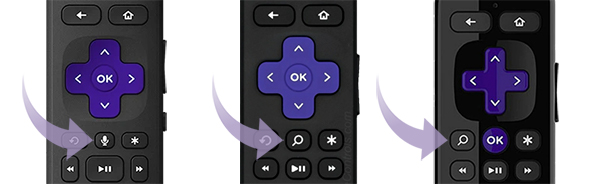
Voice search and voice control is supported on all Roku devices shipped since 2017, along with several older devices. A quick way to confirm if you are already using a Roku voice remote with your Roku streaming device is to look at your remote.
All Roku voice remotes have a voice button located near the purple directional pad that has either a microphone  or magnifying glass
  icon.
icon.
If your remote has a voice button, you have a Roku voice remote. If it does not, you have a Roku simple remote.
Roku models that support Roku voice
The streaming device models listed in the chart below work with Roku voice remotes. If you have one of these devices but do not have a Roku voice remote, you can can upgrade to a new voice remote like a Roku Voice Remote Pro (2nd edition) from the Roku accessories store. Alternatively, you can install the free Roku mobile app and use it for voice control.
To find the model of your device, go to the Home screen and select Settings > System > About.
| Device | Model | Voice Remote Model | |
|---|---|---|---|
| Roku TV Remote, Voice Remote, and Voice Remote Pro | RC-BR1, RC-BR2, RC-BR5, RC-BR6 | ||
| Roku TV System | **R4CX (Select Series 4k 2025), **R2CX (Select Series 2025) **R6CX (Plus Series 2025), **R8CX (Pro Series 2025), **R8BX (Pro Series 2025) | Supported | Supported |
| All other models | Supported | Not supported | |
| Roku Streambar | 9104R, 9102, 9101R2 | Supported | Not supported |
| Roku Soundbar | 9101, 9100 | Supported | Not supported |
| Roku Express | 3900, 3930, 3960, 3910, 3931, 3932, 3940, 3941 | Supported | Not supported |
| Roku Streaming Stick | 3600, 3800, 3810, 3811, 3820, 3821, 3840, 3830 | Supported | Supported |
| Roku Premiere | 3920, 4620, 3921, 4630 | Supported | Not supported |
| Roku Ultra | 4640, 4660, 4661, 4662, 4670, 4850 | Supported | Not supported |
| 4800, 4801, 4802 | Supported | Supported | |
| Roku 2, 3, 4 | 4210, 4200, 4230, 4400 | Supported | Not supported |
Note: Some older Roku devices not included in the list above may support limited voice capabilities.
Last updated at 2/18/2026 3:18:26 AM
Was this article helpful?
Related articles
Need more help?
