If there's a charge you don't recognize on your Roku account
If you see charges on your Roku® account or bill you don’t recognize, try these steps before contacting Roku Support.
Note: Roku never charges for Roku accounts or for customer support services.
Unrecognized charges from Disney+, Hulu, or Sling TV? Here’s who to contact
If you have a subscription to Disney+, Hulu, or Sling TV, contact the provider directly for help:
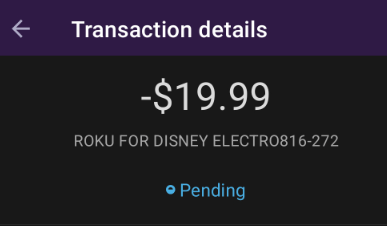
You may see the charge appear as ROKU FOR DISNEY ELECTRO followed by a series of numbers as shown below:
Confirm the charge is from Roku
On your billing statement, Roku charges will appear as “Roku,” “Roku for ____,” or “The Roku Channel.” Update payment method or turn off auto-renew to cancel these subscriptions through Roku.
Sometimes, the name on your bill might be different from the streaming service you know. This can happen if the bill shows the parent company’s name instead. For example:
- “Roku for CBS Interactive” = Paramount+
- “Roku for Warner Media Global Digital Services LLC” = HBO Max
- “Roku for AMC Networks” = Shudder
- “Roku for Starz” = Starz
- “The Roku Channel” = Premium Subscriptions on The Roku Channel

Note: The Roku Channel is always free. However, if you subscribe to a Premium Subscription through The Roku Channel (like AMC+), you’ll see a charge from “The Roku Channel.”
If “Roku” is not shown in the charge
If you see a charge that just says something like Paramount+ or Starz, this means you subscribed directly through that provider. Contact them to manage or cancel your subscription.
Determine whether the subscription is managed by a streaming service provider
Some subscriptions are billed directly by other streaming service providers (such as Netflix and Disney+) and not by Roku. You must reach out to that service provider directly with any billing questions.
How to find which subscriptions are managed by Roku
You can check whether a subscription is managed by Roku by checking in your Roku account, on your Roku streaming device, or on your bank statement. In your Roku purchase history as well as in the description in your banking statement, transactions from Roku will appear from either “Roku" or "Roku for <Channel Partner>." If “Roku" or "Roku for <Channel Partner>" is not referenced, it’s not a charge from Roku.
On the Roku website:
- Sign in to my.roku.com and go to My subscriptions
- This page shows your subscriptions managed by Roku and options to either update them or turn off auto-renew to cancel them
On your Roku streaming device:
- Press theHome
buttonon your Roku remote
- To find options to manage your subscription, you can do so in one of the following ways:
- From the Home screen
- Use the arrow buttons on your remote to hover over and highlight the app that you want more information about
- Press the Star
buttonon your remote
- Once you’ve accessed options, select Manage subscription to view the renewal date and access additional options
- From the Streaming Store
- Browse a category or genre, or search for an app
- Press theOK
buttonon your remote
- Select Manage subscription to view the renewal date and access additional options. If you don't see this option, your subscription is not managed by Roku.
Review your subscriptions and other charges
If there’s a subscription you don’t recognize, it’s a good idea toreview yourpurchase historyto determine what the charge could be, such as:
- A charge from a free trial for a streaming subscription service that you didn’t cancel. Free streaming subscription trials automatically turn into paid subscriptions that are billed on a recurring basis. To avoid being charged for a subscription, you must cancel your subscription on or before the last day of the free trial period. If the charge is for a subscription that you no longer want, you cancancel the subscriptionto prevent future charges.
- A family member or roommate who shares your Roku device made a purchase without your knowledge. If you share your Roku device with others, you may want tocreate a PINto protect against unauthorized purchases in the future.
$1.00 charge on your card
You might see a $1.00 charge on your credit or debit card. This is a temporary hold Roku uses to make sure your payment method is valid. It’s a common anti-fraud practice and not an actual charge. The $1.00 will be refunded to your account.
$1.00 charge on your card
You might see a $1.00 charge on your credit or debit card. This is a temporary hold Roku uses to make sure your payment method is valid. It’s a common anti-fraud practice and not an actual charge. The $1.00 will be refunded to your account.
Review which Roku apps are free vs. paid
Roku has both free and paid apps.
When you've selected an app that you're interested in, a screen with different viewing options will appear (such as free, free trial, paid, etc.). For subscription or premium apps to charge you monthly or annually, you must sign up or authenticate before accessing the content on that app. If you select an app that is free, you will not be asked for a one-time, monthly, or annual fee.
Check if your free trial turned into a subscription
Free trials for streaming apps automatically turn into paid subscriptions that are billed on a recurring basis. To avoid charges, turn off auto-renew to cancel the subscription on or before the last day of your free trial at http://my.roku.com/subscriptions or on your Roku device. For help, see Manage or cancel subscriptions on Roku.
Turn off auto-renew on your Roku device
- Press the Home button on your Roku remote.
- Use your remote's arrow buttons to highlight the app you want to cancel.
- Press the Star button on your remote.
- Select Manage subscription to view the renewal date and access more options.
- To cancel a subscription, select Turn off auto-renew. Your subscription will be active until the end of the billing cycle.
Check whether you have multiple Roku accounts
If you can’t find the charge in your purchase history, it’s possible that you have more than one Roku account and have made the purchase or signed up for the subscription through a different Roku account. If so, you may not realize you're being charged for a subscription, or you may be getting charged twice for the same subscription.
To keep your charges and subscriptions organized in one place and share subscriptions across Roku devices, Roku recommends that you use the same Roku account to set up all your devices. To determine what Roku account you’re using with each Roku device, verify the email that you used to set up the device.
What to do if you still don’t recognize the charge
If you still don't recognize the charge and want to dispute it,contact customer support. If the charge isn't from Roku, contact your bank or credit card company.
More resources on Roku charges
If you have more questions about identifying Roku charges, see the following resources for additional help:
Last updated at 2/17/2026 11:39:42 PM
Was this article helpful?
Related articles
Need more help?
