General battery handling and disposal
Your Roku® streaming player or Roku TV™ includes a Roku remote and a pair of matched batteries, ready for immediate use.Although batteries are generally safe, like with all things, good practice and proper caution should be exercised.
Inserting batteries
To insert the batteries, slide the battery compartment open. The images below show the proper steps for inserting each battery.
- Insert the negative (-) terminal of the battery.
- Gently push the positive (+) terminal until the battery clicks into place.
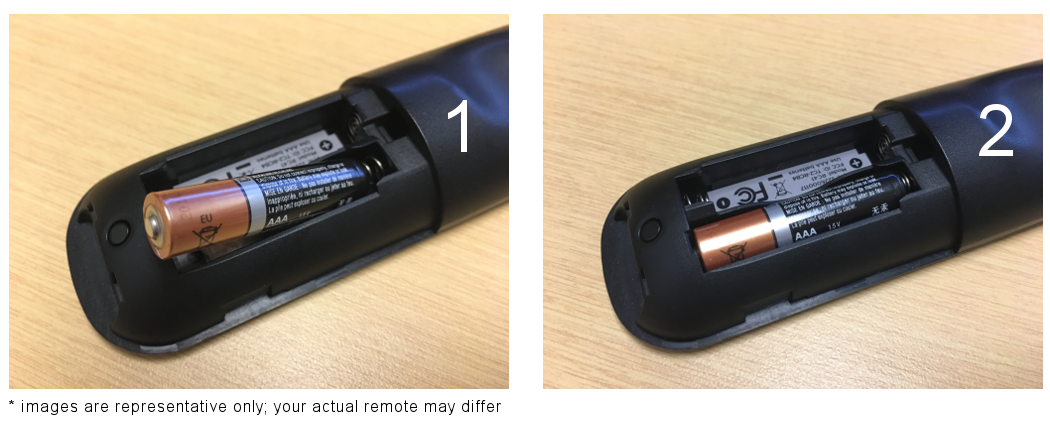
- Repeat steps 1 and 2 for the second battery.

Note: Depending on the model of Roku remote, the negative and positive terminals may be in opposite directions for each battery.
Replacing batteries
Your Roku remote uses either AA or AAA size batteries as indicated inside the battery compartment.

If you have any issues with your Roku remote, always start by replacing the existing batteries with fresh new ones.Roku recommends using batteries from the same manufacturer when possible.
- Replace all batteries at the same time
- Do not use damaged, deformed or leaking batteries
Battery leaks
If a battery leak occurs, handle items with rubber gloves and protective eye wear to reduce chance of contact. If skin or eye contact does occur, flush immediately with clean water and seek medical assistance.
Warm or hot to touch
If the back of your Roku remote gets warm or hot during normal use, the rechargeable battery may be damaged or the alkaline batteries may be corroded.
- Discontinue use of your remote.
- Disconnect your rechargeable remote from the charging cable.
- Place remote on a hard non-flammable surface (like tile) and let it cool. Do not attempt to remove the alkaline batteries while hot!
Disposal
Always dispose of batteries following federal guidelines or local ordinances.Neverdispose of used batteries in open fire.
Related
Last updated at 2/19/2026 7:56:54 PM
Was this article helpful?
Related articles
Need more help?
