When you link a payment method to Roku Pay, you can purchase services and promotions directly through your Roku streaming device and your Roku account. Roku Pay accepts the following forms of payment:
- MasterCard
- Visa
- PayPal
- Apple Pay (visit my.roku.com using Safari to add Apple Pay)
- American Express (not available in France)
- Discover (available only in the U.S. and Canada)
- Prepaid gift cards if the payment merchant (e.g., Visa, Discover) is accepted in your geographic region
Update credit card details from your Roku device
- Press Home
 on your Roku remote
 - Scroll and select Settings
- Select Payment method and continue to one of two options.
- Update payment method. Update your existing credit card information, such as expiration date.
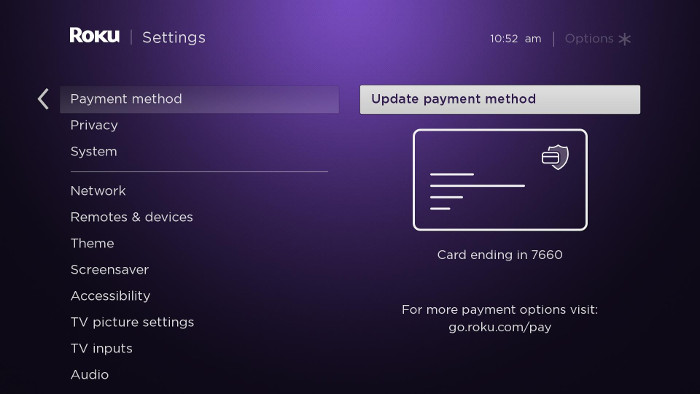
- Add payment method. Add a new credit card to your Roku account.
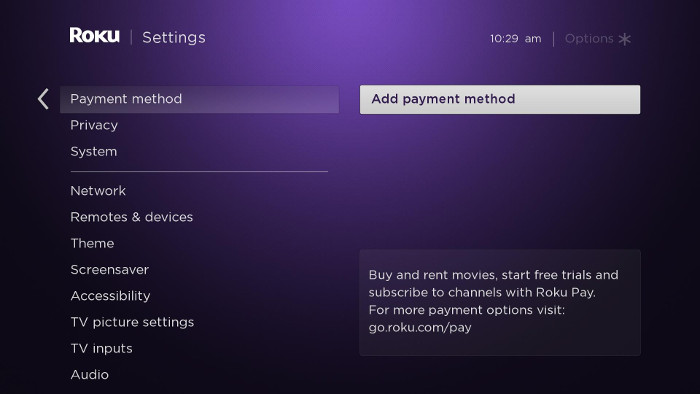
- Update payment method. Update your existing credit card information, such as expiration date.
- Enter your payment information in each field as it appears on your credit card.
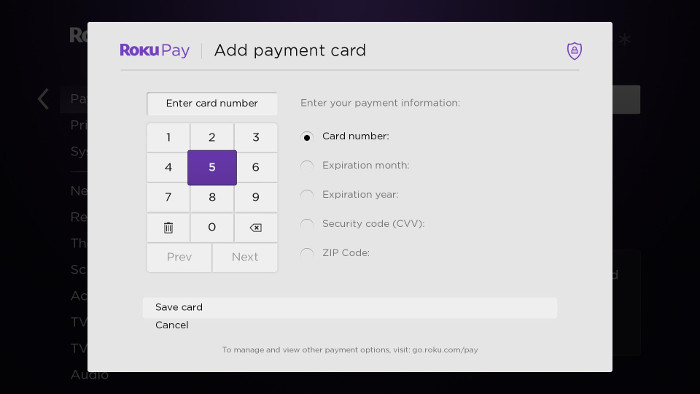
- Select Save card.

Note: To add a PayPal account, visit go.roku.com/pay and sign in if prompted. Get help signing in if needed.
Update payment information on your account
- Go to my.roku.com. on your computer or smartphone
- If prompted, sign into your Roku account. For help signing in, learn what to do if you have forgotten your login details.
- Click or tap Update under Payment method
- Complete all required fields and click Save
Troubleshooting
The following suggestions may help resolve issues entering your payment information.
- Check each set of numbers on your credit card to make sure you entered them correctly.
- Try a different credit card or PayPal
- If you are updating from a computer or smartphone, try using a different web browser such as Chrome or Firefox.
- Go to Settings > Network > Check connection and confirm your Roku device is connected to the internet. For help, visit the steps for setting up this connection
Last updated at 2/17/2026 10:18:04 PM
Was this article helpful?
Related articles
Need more help?
